The Commit Workflow: Defensive Engineering with AI
Recently, I wrote about why the code is the documentation. It is a great ongoing approach, but in the early days of a project, clean code usually loses the battle against moving fast. We skip the hygiene, we ignore the .gitignore, and we tell ourselves we will write the tests later.
I have started using a new approach to fix this. It is not a rigid set of Bash scripts that break the moment you pivot, and it is not a black box AI that writes code for me.
Instead, it is a Commit workflow. This is a series of agentic tasks I have created in the https://github.com/joeshirey/AgenticCodingHelperTemplates repo.
The Tooling: Gemini-CLI and Antigravity
I generally use two specific tools in my development approach these days and have built helpers for both scenarios because they serve different needs in my work.
- gemini-cli: This is my go-to for atomic, terminal-based tasks. I have built a suite of slash commands that allow me to trigger specific hygiene checks instantly without leaving the command line. It is fast, lightweight, and works well for just-in-time engineering.
- antigravity: When a task requires more than a quick check, I move to antigravity workflows. It allows me to orchestrate complex, multi-step sequences. This turns a series of prompts into a professional pipeline that keeps my project lifecycle on track.
The Anatomy of the Commit Sequence
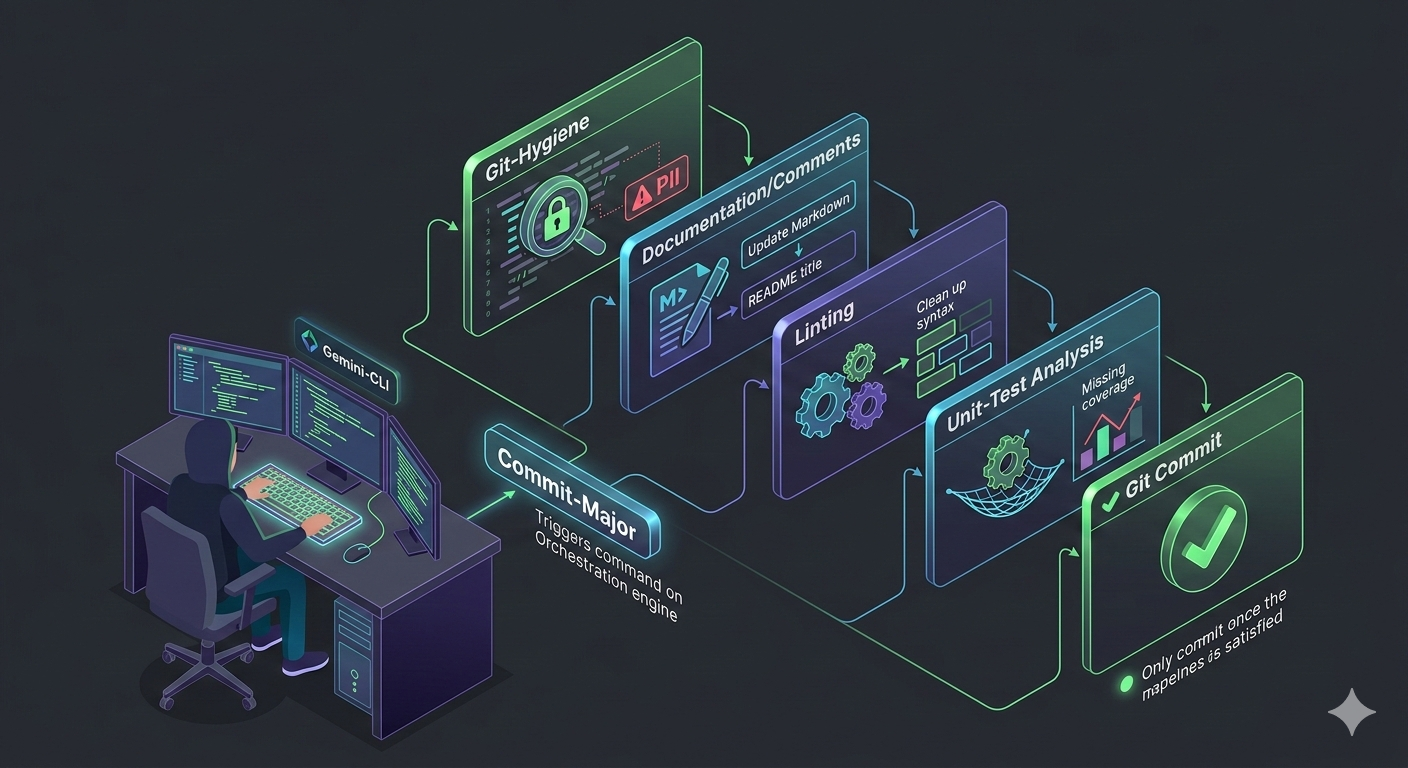
In this approach, the “commit-major” workflow acts as an orchestrator. It chains together several defensive tasks. Each one is a hurdle the code has to clear before I allow a commit.
- Check Git Hygiene (
check-git-hygiene): Scans the codebase for secrets/sensitive data and verifies.gitignoreconfiguration before committing. - Update Documentation (
update-docs): Synchronizes the rootREADME.md, Product Requirements Doc (PRD.md), and Technical Design Doc (TDD.md) with the current code state. - Update Comments (
update-comments): Analyzes complex logic and ensures code is well-commented to explain why (not just what) something is done. - Run Linting (
run-linting): Automatically detects the project language (e.g., Python/uv, JS/TS, Java, Go, C#), ensures linters are present, and applies automatic fixes for code quality. - Run Unit Tests (
run-unit-tests): Runs project unit tests and assists with infrastructure setup if needed. - Commit Changes (
commit-changes): A standardized process for reviewinggit diff, drafting a commit message, seeking user approval, and pushing the code. - Commit Major (
commit-major): A rigorous macro-workflow composed of multiple other steps. It sequentially runs:check-git-hygiene->update-docs->update-comments->run-linting->run-unit-tests->commit-changes. If any step modifies files (e.g., unit tests or linting changes), the process restarts.
Human-in-the-Loop
The most important part of this workflow is that the agent does not have the commit authority.
Each step is designed to automate as much as possible and provide feedback to the human developer where needed. The agent acts as a highly disciplined peer reviewer. It flags the PII, suggests the doc update, and recommends how to fix failing tests.
I make the final call. I review the suggestions, fix or work with my agents to fix the issues, and then commit. This keeps me in control while the AI handles the cognitive load of the chores.
Make It Yours
The commit-major workflow I have shared is what works for me. It reflects my personal standards for hygiene and documentation. However, the beauty of using gemini-cli slash commands and antigravity workflows is that they are entirely customizable.
Every team has different scars and different standards. You should take these templates and tailor them to your team’s specific needs. If you care more about performance benchmarks or specific accessibility checks, you can bake those into your own custom commit cycle.
By using AI to build these practices early in the lifecycle, you ensure excellence from day one. You get the benefits of automation without the overhead of building a massive, brittle suite for a project that is still finding its feet. Once you get to a point where the project is stable, you can always move to traditional scripting to run these tasks.