Apple Containers: A Few Tools I've Been Building
What are Apple Containers
Last year Apple shipped a container CLI tool called container, and it recently hit 1.2. It’s open source, lives at apple/container on GitHub, and it runs containers natively on Apple Silicon using the Virtualization.framework that Apple has been building out since macOS 11.
The short version: it’s a tool for running OCI containers on your Mac without Docker Desktop or any third-party runtime.
Why You Might Use It Instead of Docker or Colima
I’ve used Docker and then Colima for years. Both are solid tools. But there are cases where container is the more practical choice depending on what you’re doing.
What’s different:
- No daemon.
containerdoesn’t run a persistent background process watching resources. You start the system service when you need it, stop it when you don’t. - It uses Apple’s Virtualization.framework directly, which on Apple Silicon means you get hardware-accelerated virtualization that Apple maintains and optimizes as part of macOS itself.
- It’s Open Source, from Apple, targeting Apple Silicon. That’s a narrower scope than Docker, which means less surface area and less overhead for workloads that fit inside it.
Where Docker or Colima still make more sense:
- You need Compose or any kind of orchestration.
containeritself has none of that. If your workflow isdocker compose up, stay on Docker. The one exception worth knowing: kiac gives you a local Kubernetes cluster where each node runs as its own VM via the Virtualization.framework — so if Kubernetes is the orchestration you need, there’s a path. But Compose has no equivalent. - You’re on an Intel Mac.
containerdoesn’t run on Intel. - You need features like
docker commit,docker pause, image manifests, or plugins. Many Docker commands have no equivalent incontaineryet. - You need to work across machines or share containers with teammates on non-Mac systems. Docker’s ecosystem is broader.
Where container holds its own:
- Local development on Apple Silicon where you just need to run a container or two.
- Situations where you want to minimize background resource usage.
- Building and running arm64 images natively without any emulation overhead.
- If you’re building AI tooling and want a lightweight, controllable container runtime you can script against.
It also requires macOS 26 or newer, so if you’re not on Sequoia or later, it’s not an option.
The MCP Server
When container first shipped, I wanted to be able to manage it through Claude and other LLM tools. So I built an MCP server for it: joeshirey/AppleContainerMCP.
It’s been updated to work with container 1.2, and it exposes the full surface of the CLI as MCP tools: containers, images, volumes, networks, registry, builder, machines, file copies, and system management. You can point Claude, Cursor, Gemini CLI, or a VSCode extension at it and manage your container environment through natural language.
If that’s your workflow, the repo has install instructions and works with uv for package management.
d2c: Translate Docker Commands to container
One friction point with switching to container is muscle memory. If you’ve spent years typing docker run, docker ps, docker exec, those habits don’t go away.
d2c is a CLI tool I added to the same repo that translates Docker commands to their container equivalents and runs them. It’s a standalone terminal utility with no LLM involved.
d2c [--dry-run] <docker-command> [args...]
--dry-run shows you the translation without executing anything, which is useful when you want to understand what it would do before it does it.
What it translates (~30 commands):
| Category | Commands |
|---|---|
| Container lifecycle | ps, run, exec, stop, start, kill, rm, logs, inspect, cp, create, export, stats |
| Images | images, pull, push, rmi, tag, build, load, save |
| Auth | login, logout |
| Subcommand groups | network, volume, system, image, builder |
The Docker management namespace stripping works automatically, so docker container run and docker run both resolve the same way.
What it doesn’t translate:
container doesn’t have equivalents for everything Docker does. Rather than failing silently or producing broken output, d2c refuses these upfront and tells you why:
- Orchestration:
compose,swarm,service,stack,node,secret,config - Image operations:
commit,import,history,manifest,search - Lifecycle gaps:
pause,unpause,restart,rename,attach,wait,port,diff,events,checkpoint - Other:
context,plugin
For any of those, you’ll get a message explaining there’s no equivalent, which is more useful than a cryptic error.
Apple Containers Desktop
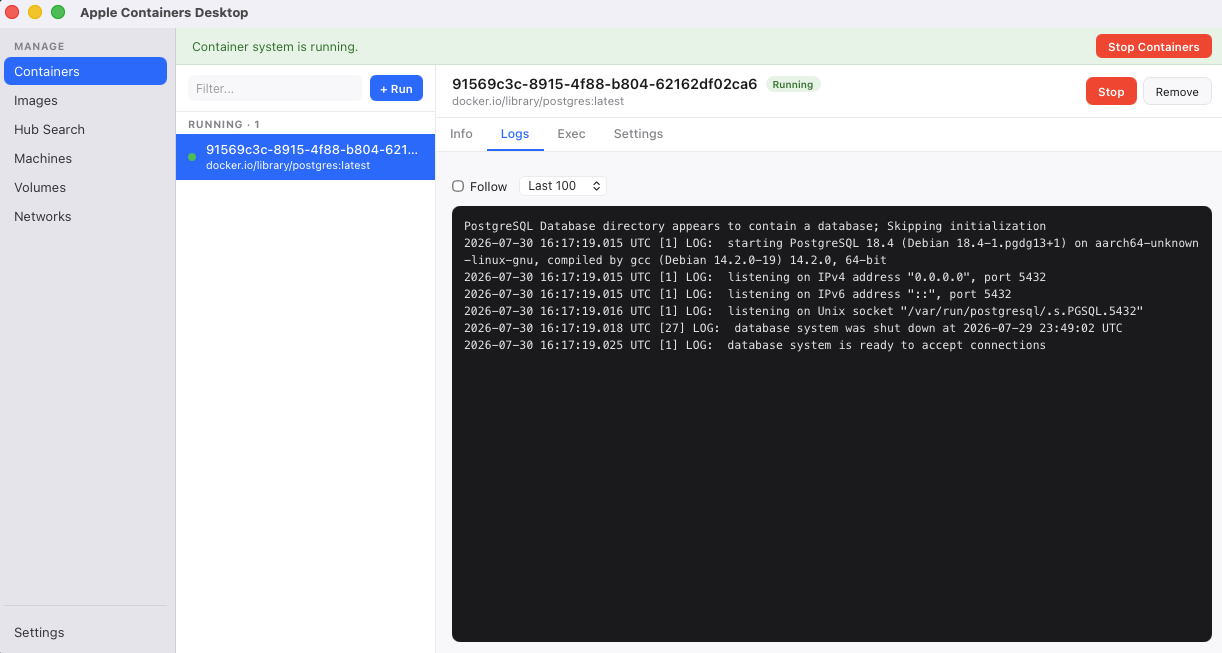
I’ve been building a GUI front end for container: AppleContainerDesktop. It’s a native Mac app built with Tauri (Rust backend, React frontend) that gives you a sidebar with your containers, images, VMs, volumes, and networks. Click on any of them and you get logs, a shell, and a settings panel.
It’s built on top of the container binary you already have installed. No daemon, no separate data store. Everything the app does, you could have typed at the prompt yourself.
What’s in it today:
- Container list (running and stopped), with a four-tab detail view: Info, Logs, Exec, Settings
- Settings editing with a diff preview before any destructive change, and recovery output if a re-run fails
- Image management: list, run, remove, prune, pull, build from Dockerfile with streaming output
- Docker Hub search with official image badges and tag selection
- Container machines: create, manage, shell into, configure CPUs/memory and home mount mode
- Volumes: list with ceiling vs. actual-on-disk size columns, and per-volume container attachments
- Networks: list, create with subnet and host-only options, and per-network container attachments
- System status banner with start/stop
What’s missing:
The known gaps are documented honestly in the repo README. Short version: no registry login UI, no cp in or out, some build flags that have to go through the terminal, and partial coverage on volume and network creation options.
The catch:
This is version 0.1. There are no downloads, no release binaries, no notarization. To use it, you clone the repo and build it yourself. You need Node.js 20+, Rust via rustup, and Xcode Command Line Tools. The build takes a couple of minutes the first time and is fast after that.
If this gets traction and people find it useful, I’ll look at proper distribution — signing, notarization, a real release. For now, building from source is the supported path and it’s a reasonable ask for the audience that would use container in the first place.
If you run into anything broken or missing, the repo is open. Issues and PRs are welcome.