Part 4: Running Untrusted Tools Safely
In the last post I described how the coordinator discovers and injects third-party skills at dispatch time — finding the right tool for a task, vetting it by reputation, and wiring it into whatever harness is active.
But I left the hardest part underspecified: what does “vetting” actually mean? The discovery post hand-waved toward a security pipeline. This post is about what’s inside it.
The moment you let an agent inject code it didn’t write, you need a system that answers one question: is this safe to run? Maybe it’s a formatting helper from a trusted org. Maybe it’s a community-contributed test runner that happens to read ~/.ssh/id_rsa on line 40. The coordinator can’t tell the difference without a pipeline that decides for it.
So I built one. Four scripts, one pipeline, zero trust by default.
The pipeline
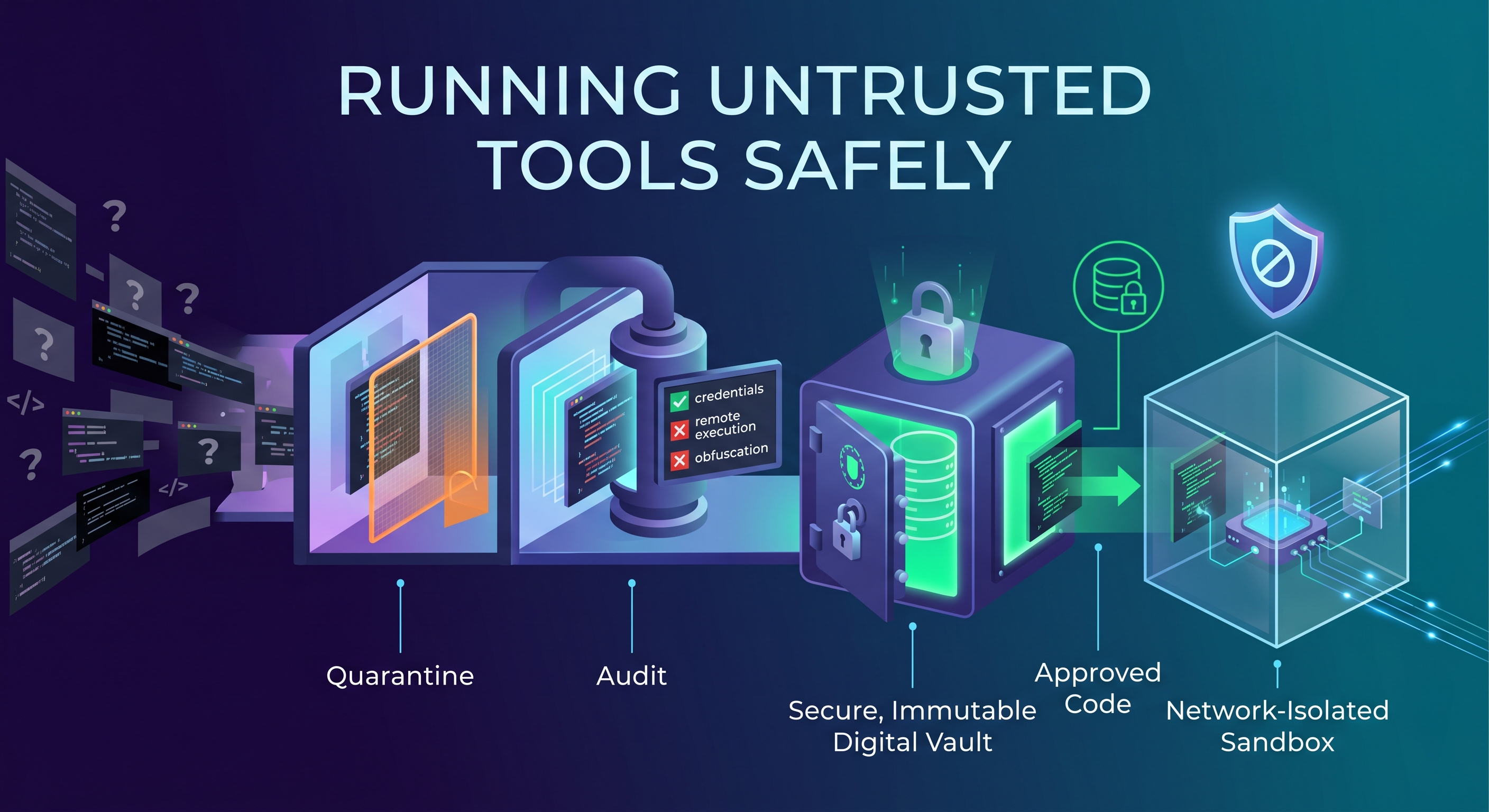
The whole thing fits in one sentence: fetch it, quarantine it, audit it without running it, vault the approved copy, and execute it only inside a sandbox.
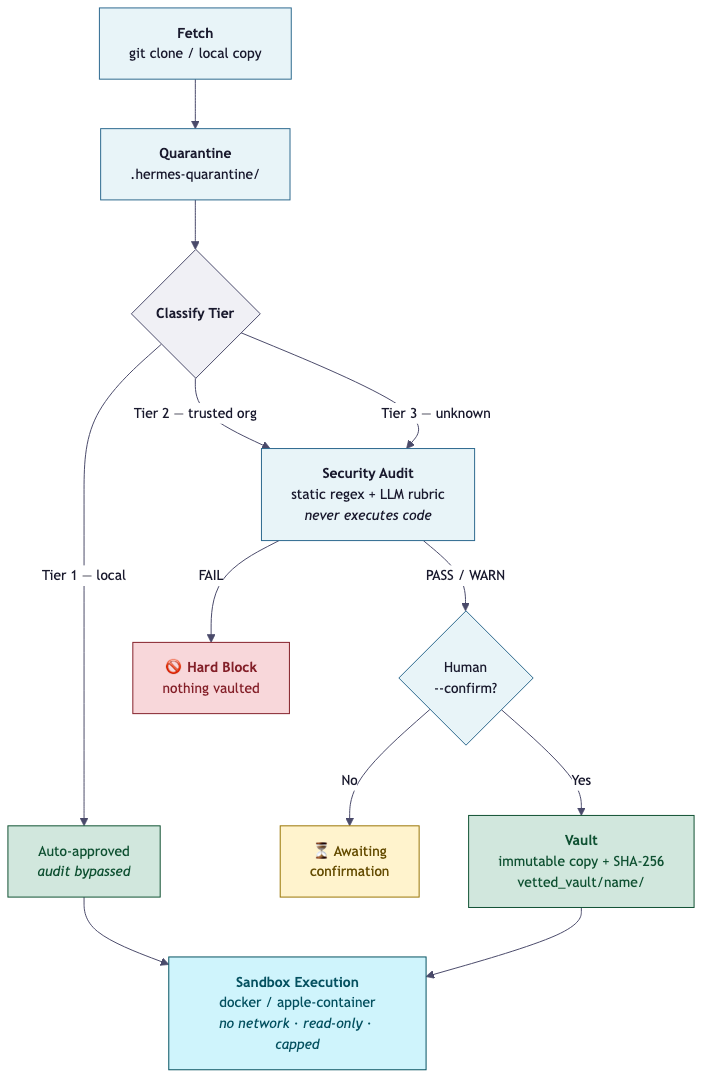
Each step is its own script, and each one enforces a single rule:
skill_ingest.py— the only sanctioned door into the vault. Fetches a source (local path or git URL), copies it into quarantine, runs it through the auditor, and vaults the result if it passes. The quarantine copy is always cleaned up afterward.security_auditor.py— reads code and flags dangerous patterns. Never executes what it reviews.vetted_vault.py— classifies sources by trust tier, hashes them with SHA-256, and maintains an immutable registry of approved tools.container_runner.py— the only place approved code actually runs, inside a network-isolated, resource-capped sandbox.
Nothing fetched is ever executed during ingestion. That constraint is load-bearing. The auditor reads files; the container runner executes them later. Those two jobs never share a boundary.
Trust tiers
Before the auditor even looks at the code, the vault classifies the source into one of three tiers based on where it came from:
Tier 1 — local. The source lives under ~/.hermes-coder/skills or ~/.hermes-coder/scripts. I wrote it, it’s on my machine, and it’s auto-approved. The audit is bypassed entirely.
Tier 2 — trusted org. The --origin matches a configured list of known organizations: Google, Anthropic, AWS, Microsoft, the Model Context Protocol project. The code still gets audited, and a human still has to confirm before it enters the vault. Trusted doesn’t mean unvetted — it means the source has a reputation, and the reputation buys it a shorter review, not a free pass.
Tier 3 — unknown. Everything else. Same audit, same confirmation gate, same sandbox. The only difference between Tier 2 and Tier 3 in practice is how carefully I read the code when the system asks me to confirm.
The tier drives two decisions downstream: whether the source needs --confirm before vaulting (Tier 2 and 3 always do), and whether it’s allowed to run without a sandbox (only Tier 1).
The auditor never runs the code
This was the design decision I spent the most time on, and the one I’m most glad I stuck with.
The security auditor reviews source code in two phases:
Phase A is static. A set of regex rules scans every file for patterns that should never appear in a tool you’re about to inject into a coding agent. The rules are intentionally conservative — a false warning costs a human glance; a missed match ships malware.
The FAIL-category patterns are the ones that hard-block:
- Code execution:
eval(),exec(),os.system(),subprocesswithshell=True,pickle.loads(),__import__(),child_process.exec(), backtick command substitution. - Obfuscation: base64-decoded payloads feeding exec, long opaque base64 or hex literals — the kind of strings that only exist to hide what they do.
- Credential access: anything reaching for
~/.aws/credentials,~/.ssh,id_rsa,.netrc, GitHub CLI config, macOS Keychain, browser cookie databases, or environment variables named*_TOKEN,*_KEY,*_SECRET,*_PASSWORD.
Network egress — requests.post, urllib, raw sockets, fetch(), hardcoded IPs, curl, wget — is a WARN, not a FAIL. A tool that phones home is suspicious but not necessarily malicious; a tool that reads your SSH keys is.
Phase B is LLM-backed. The auditor sends the source files to whichever coding harness is active (the same swappable harness layer from the last post) with a strict rubric: flag anything that could exfiltrate secrets, execute arbitrary code, read credential files, or make hidden network calls. The LLM pass corroborates and can escalate, but it never overrides a clean static scan into a PASS. If the static scan says FAIL, the aggregate verdict is FAIL regardless of what the model thinks.
The aggregate logic is simple: any FAIL from either phase makes the whole verdict FAIL. Otherwise, any WARN makes it WARN. Otherwise, PASS.
If the coding harness is down — the cloud API is unreachable, the model endpoint times out — Phase B is skipped and the static-only verdict still gates the decision. The system degrades to the conservative option, not the permissive one. A tool that would have been caught by the static rules is still caught. The LLM pass is a second pair of eyes, not the only pair.
The vault is immutable
When a source passes the audit, it gets copied into ~/.hermes-coder/vetted_vault/<name>/ and registered in vetted_tools.json with its SHA-256 hash. That vault copy is the only version of the tool that’s allowed to run. Not the version you downloaded, not the version in the quarantine directory, not whatever’s sitting at the remote URL right now. The vault copy.
This is what makes the pipeline tamper-resistant. If the upstream source changes after you’ve vaulted it, the hash won’t match. The vault’s update command handles this: it fetches the upstream, re-hashes it, runs the auditor on the new version, and only replaces the vault copy if the audit passes and you confirm. The previous version gets archived under vetted_vault/.archive/<name>/<old_sha>/ so you can roll back.
Approval works by checksum first, name second. If you vault a tool under one name and later encounter the exact same code under a different name, the matching SHA-256 recognizes it as already approved. A name match with a different SHA reports outdated — the code changed, re-vet the diff.
The sandbox
The container runner is the last gate. When a vaulted tool actually needs to execute — not during ingestion, only at dispatch time — it runs inside a container with these constraints:
docker run --rm --network none --cpus 1 --memory 512m \
  -v <vault-path>:/work:ro -w /work <image> sh -lc '<cmd>'
No network. Read-only mount. One CPU, 512MB of memory, a hard timeout. The tool can read the files it was given and produce output. It cannot call home, it cannot write to the vault, and it cannot outlive the timeout.
Runner selection is automatic. On Apple Silicon with the container CLI available, it uses Apple’s native container runtime. Otherwise it falls back to Docker. If neither is installed, it drops to local-restricted mode — and in that mode, Tier 2 and 3 tools are simply blocked. They don’t run. There is no fallback where untrusted code executes on the host because the sandbox wasn’t available. That path doesn’t exist.
Tier 1 tools — your own code, on your own machine — can run locally without a container. Everything else goes through the sandbox or doesn’t run at all.
Where the human stays in the loop
The pipeline is automated, but it’s not autonomous. There are two hard gates where a human has to make a call:
The confirmation gate. Any Tier 2 or Tier 3 source that passes the audit gets status awaiting_confirmation. The system prints a warning, shows the audit findings, and gives you the exact command to re-run with --confirm. You’re expected to read the source before you run that command. A clean audit is not a rubber stamp — it means the static rules and the LLM didn’t find anything obvious. “We didn’t find anything” is not the same as “there’s nothing to find.”
The FAIL gate. A FAIL verdict hard-blocks. The source is not vaulted, not injected, not executed. There’s no --force flag, no override. If the auditor says FAIL, the answer is no. Fix the source and re-submit, or don’t use it.
This is deliberate. The pipeline exists to make the common case — a clean tool from a known source — fast and safe. The uncommon case — a tool that trips the auditor — should be slow and manual. The friction is the feature.
What I’d do differently
The static rules are good at catching what they’re written to catch, and blind to everything else. A determined adversary who avoids eval and subprocess and ~/.ssh can write a malicious tool that passes the static scan clean. The LLM pass helps here — it reads semantics, not just patterns — but I wouldn’t rely on it as the sole defense against a targeted attack.
The real mitigation is the sandbox. Even if a tool slips past the auditor, it runs network-isolated with a read-only mount. The blast radius is capped by the container constraints, not by the auditor’s ability to predict every possible attack vector. Defense in depth, not a perfect gate.
The other thing I’d revisit is the tier classification. Right now, “trusted org” is a flat list in the config. There’s no gradient — Google and a well-known open-source project get the same Tier 2. In practice this hasn’t mattered because I still review both, but a more granular reputation system would let me calibrate how much scrutiny each source deserves.
What’s next
The pipeline answers “how do you run untrusted tools safely.” The next question is about the most visible place the coordinator touches shared state: a project’s backlog.
The next post is about turning GitHub Issues into the agent’s work queue — creating context-rich issues from raw ideas, enriching thin tickets with structured metadata, triaging overnight, and grooming the backlog weekly. It’s where the coordinator does its most useful unattended work, and the place where the question of “how much should it be allowed to do on its own” becomes concrete.
The Hermes Agent series
- Part 1: I Built an Always-On AI Coding Agent That Plans, Codes, and Reviews Its Own Work
- Part 2: One Coordinator, Swappable Coding Engines
- Part 3: Dynamic Tool Discovery and Injection
- Part 4: Running Untrusted Tools Safely (this post)
- Part 5: GitHub Issues as the Agent’s Backlog
- Part 6: The Autonomy Ladder
- Part 7: How the Agent Learns From Its Mistakes